
I would hope this is obvious to anyone who’s been around the iOS eco-system during an iOS beta period: Make sure your apps will continue to work with the new release!
Last week I tweeted this:

The message was clear: Now is the time to smoke-test your existing apps using the available (to developers) iOS6 beta and/or iOS6 simulator.
Of particular concern should be older apps built from templates in the iOS2 or iOS3 timeframe. When I built one of my apps and ran it in the iOS6 simulator, the app ran, but I saw this error in the debug window:
2012-08-01 08:27:43.166 ….. Application windows are expected to have a root view controller at the end of application launch
The issue stems from (old) template code with the following boilerplate (or similar):
-(BOOL)application:(UIApplication *)application didFinishLaunchingWithOptions:(NSDictionary *)launchOptions
{
    [window addSubview:[rootViewController view]];
    [window makeKeyAndVisible];

    return YES;
}
The fix is simple. Just one additional line of code is required in the above method. I put it first:
window.rootViewController = rootViewController;
For applications that use only portrait mode, this problem is not surfaced to the user as the app runs. However, if your app has any landscape views, they will not appear correctly. To wit, another of my old apps which has only landscape views, before being fixed:
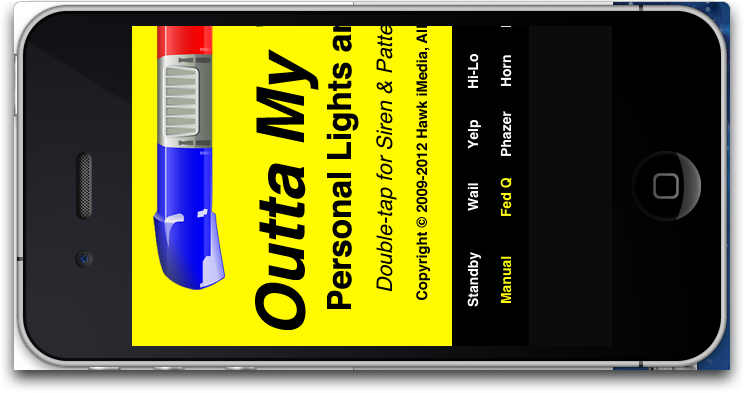
By the way, if you recognize this app, and you are a user and/or a fan, I am planning to have it updated before iOS6 goes live. :-)
In another app, the main view was portrait, but the app allowed for the device to be rotated to landscape and presented a landscape view. With this problem, the landscape view didn’t even appear, as if the message that the device had been rotated was not delivered.
The aforementioned one-line addition fixes these problems. The issue seems to be that with no defined rootViewController on the main window object, device orientation cannot be communicated to underlying view controllers. Once the window’s rootViewController is properly set, the problem is fixed.
More current application template code does not suffer from this issue, it seems.
It’s always a good idea to check your apps when a new major version of iOS is coming out, not only for SDK issues (deprecated methods, modified structures, and whatnot), but also because the compiler might have changed. Other small issues I found in some of my apps had to do with more strict type checking for both variable assignments and parameter passing. And while a lot of these kinds of problems appear as warnings in Xcode, it’s always a good idea to clean up these things in your code for “good hygiene.”
With probably about 6 weeks or so until iOS6 becomes generally available (according to MacRumors and other sources), there is still plenty of time to make sure your users will not have a nasty surprise when they run your (old) apps.